Attendance, biometrics & geofencing

The one thing every business needs solved first.

Time theft and buddy-punching cost more than payroll automation ever will. Attendance is where HR360 starts for most customers: shift scheduling, biometric and geofenced check-in, and leave, all checked against each employee’s assigned shift and feeding straight into Payroll.

Shifts & schedules$2/employee/moIncluded in every plan

Build the shift once, assign it to whoever works it.

Set up shift patterns — fixed, rotating, split — and assign them to individuals or whole teams. Every check-in is then checked against the shift window that applies to that person on that day, which is what makes overtime and lateness calculations meaningful instead of guesswork.

  • ✓Shift patterns you build once and reuse across teams
  • ✓Rotating and split shifts for teams that don’t work a flat 9-to-5
  • ✓Check-in checked against each employee’s assigned shift window, not a single company-wide clock
Open this module in the calculator →
Shift rosterThis week
Morning
Night
Rotating
Split
Biometric & mobile check-inIncluded with AttendanceEvery plan

Clock in at the device, or from the phone in the field.

Biometric devices connect in for fixed-location teams, and the mobile app lets field, retail and site-based staff check in and see their shift from their phone, with the location checked against the site’s geofence. It’s built for businesses with more than one site or a workforce that isn’t sitting at a desk.

  • ✓Biometric device integration for fixed sites and offices, no extra licence
  • ✓Mobile check-in for field and retail teams, checked against a geofenced radius per site
  • ✓One attendance record whether the check-in came from a device or a phone
My Time · Aug 23–29This week
Sun
9:02
8:57
9:00
8:49
9:05
Sat

Geofence radius · Main site

LeaveIncluded with AttendanceEvery plan

Leave requests, balances and approvals, on the same calendar as attendance.

Employees request time off, managers approve or decline it, and approved leave shows up right on the attendance calendar alongside check-ins — so a day off isn’t flagged as an absence, and a payroll run for that period already knows about it.

  • ✓Leave requests and approvals, without an email thread or a paper form
  • ✓Leave balances tracked per employee
  • ✓Approved leave reflected directly on the attendance calendar, feeding Payroll automatically
Leave requests2 pending
Annual leave
Sick leave
Unpaid
Overtime, breaks & exceptionsIncluded with AttendanceEvery plan

Overtime and break time captured automatically, not tallied by hand.

Because check-ins are matched against each employee’s assigned shift, overtime, late arrivals and break time are captured as they happen rather than reconstructed at month-end. That capture is what Payroll reads to calculate overtime pay automatically on the next run.

  • ✓Automatic overtime capture based on the assigned shift window
  • ✓Break-time tracking built into the same check-in flow
  • ✓Exceptions — late arrivals, missed check-outs — visible to HR before payroll runs, not after
Exceptions3 this week
Late arrival
Missed check-out
Overtime logged
Included in every plan

Attendance is $2 per employee, per month.

Bundled into every HR360 plan alongside Core HR — it’s the module most customers turn on first.

Explore the rest of HR360

Every module reads from the same employee record

See exact pricing for your team.

Pick your modules, enter your headcount, get a number in 30 seconds.

See It In Action

A real look inside the HR360 Attendance & Time Tracking dashboard.
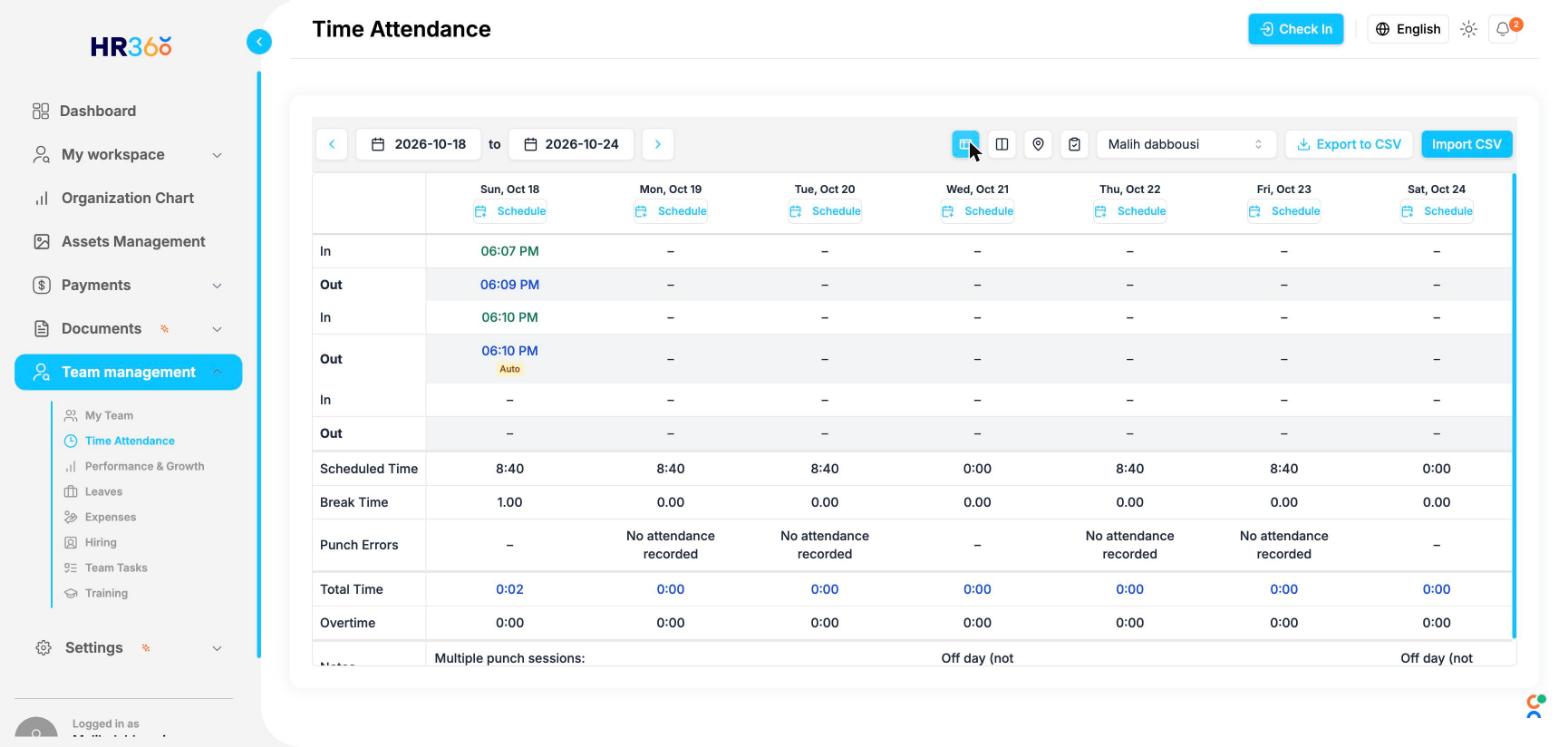
HR360 Attendance dashboard screenshot
Cost calculator

What will Attendance cost you?

Move the slider to your headcount — we’ll show you the cheaper of per-employee pricing or the flat band automatically.

20
Per-employee ($1.90/mo)
$0
Flat band
$0
You pay $0/mo — the cheaper of the two, auto-selected.
Included free — once you’re on the Growth plan (51+ employees) or above, Attendance costs $0.